
SoundCloud Playlist Downloader
Paste a SoundCloud playlist link, pick the tracks you want, and download them one by one or together as a ZIP.
Download SoundCloud Playlists
Working with a long playlist? SC Tracks lets you load a SoundCloud playlist, select the tracks you want, and download them in your preferred format.
You don’t have to download every track. Choose the songs you actually need and keep your music library organized your way.
How to Download a SoundCloud Playlist
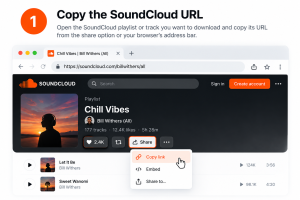
1. Copy the SoundCloud URL
Open the SoundCloud playlist or track you want to download and copy its URL.
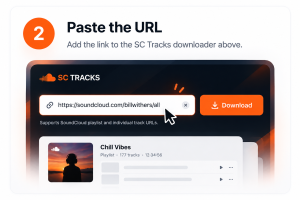
2. Paste the URL
Add the link to the SC Tracks downloader above.
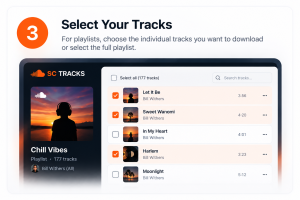
3. Select Your Tracks
For playlists, choose the individual tracks you want to download or select the full playlist.
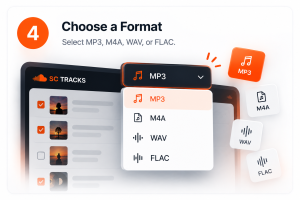
4. Choose a Format
Select MP3, M4A, WAV, or FLAC.
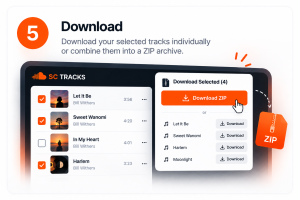
5. Download
Download your selected tracks individually or combine them into a ZIP archive.
Download Selected Tracks or a Full Playlist
Not every playlist needs to be downloaded in full.
Select individual tracks from a playlist, choose your preferred audio format, and download exactly what you want. For larger selections, you can combine multiple tracks into a single ZIP archive.
Select tracks → Choose a format → Download
SoundCloud Playlist to MP3, WAV, FLAC & M4A
Choose the format that fits your music library or workflow.
MP3
A widely supported format for everyday listening, portable devices, and general music libraries.
M4A
A compact modern audio format suited to efficient music storage and playback.
WAV
An uncompressed audio format commonly used for editing, production, and professional audio workflows.
FLAC
A lossless compressed format for maintaining lossless audio while using less storage than uncompressed WAV.
Download SoundCloud Playlists as ZIP
Downloading a large playlist track by track can be tedious. SC Tracks lets you package selected playlist tracks into a single ZIP archive.
Choose the tracks you need, select your preferred format, and download them together as one file. Once downloaded, extract the archive and organize the tracks in your music library.
SoundCloud Track Downloader
Only need one track?
SC Tracks also works as an individual SoundCloud track downloader. Paste a track URL, choose an available audio format, and download the file directly through your browser.
There’s no need to load an entire playlist when you’re only looking for a single track.
Built for DJs, Music Collectors & Everyday Listening
Music libraries aren’t all managed the same way. DJs may want to select specific tracks from a playlist, collectors may prefer lossless formats, while everyday listeners may simply want a convenient MP3.
SC Tracks keeps these workflows in one place with playlist selection, multiple audio formats, individual track downloads, and ZIP downloads.
Your playlist. Your tracks. Your format.